Prerequisites
- A Linux server running Ubuntu Server* on an x86_64 CPU. SRCDS will not run on other architectures (sorry Raspberry Pi folks).
- A SFTP/SSH client (PuTTY, Termius, FileZilla, MobaXterm, etc.)
- At least 16GB free storage
- At least 10Mbps upload if you want players to join over the Internet (LAN-only servers do not care as much)
This guide was written and tested on Ubuntu Server 20.04 LTS, but most Debian-based distros should be very similar.
*Ubuntu 20.04 LTS is where Canonical started phasing out many i386 libraries from main repos. TF2C/Steam/SteamCMD are known to work, but some Source games, plugins, or addons can still need extra package sources.
1. Create a steam user
Pick an install location first:
/optis the usual server location/homeis also fine if you prefer
If you install in /home, you can omit -d and let useradd create the home directory automatically.
For this guide, we will use /opt/tf2classic.
sudo useradd -m -d /opt/tf2classic -s /usr/bin/bash steam
sudo passwd steam-mcreates the home directory-d /opt/tf2classicsets it explicitly-s /usr/bin/bashsets the shell
2. Install dependencies and Source SDK Base 2013 DS
SteamCMD is in the multiverse repo. TF2C and SteamCMD also require i386 libraries. You will also need p7zip-full for TF2 Classic archives.
Enable repos/architecture and refresh package metadata:
sudo add-apt-repository multiverse
sudo dpkg --add-architecture i386
sudo apt update
Install required packages:
sudo apt install steamcmd p7zip-full unzip
sudo apt install libncurses5:i386
Switch to the steam user and launch SteamCMD:
su - steam
steamcmd
Then run these commands inside SteamCMD:
login anonymous
force_install_dir /opt/tf2classic/server
app_update 244310 validate
exit
3. Download and extract TF2 Classic
Download the full game archive (not a patch) from one of these mirrors:
Expected MD5 checksums:
A2F240E0136B0E330C91D788CD317AFC *tf2classic-2.0.1.7z
CB9C8F8F732FBF118C1149F8D2A07DAB *tf2classic-latest.7z
(Archive sizes may differ due to compression, but extracted data should match.)
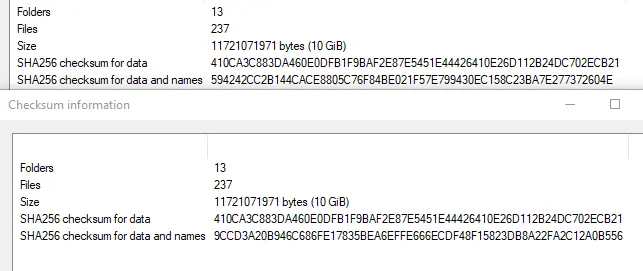
Download on the server:
wget https://khromier.com/tf2c/tf2classic-2.0.1.7z
# or
curl -L -O https://khromier.com/tf2c/tf2classic-2.0.1.7z
If your connection is unstable, grab the torrent on another machine, then upload via SFTP:
magnet:?xt=urn:btih:2fc7113011ff80f8f05ad8df00b8228aad230117&dn=tf2classic-2.0.1.7z&tr=udp%3a%2f%2ftracker.opentrackr.org%3a1337%2fannounce
Extract and move the folder into your SDK directory:
7z x tf2classic-2.0.1.7z
mv tf2classic insert_full_path_to_server_directory_here
4. Configure server files
Generate config files on cfg.tf.
Set server type to Internet and LAN if people outside your LAN should join.
Upload the generated ZIP via SFTP, then:
unzip <archive>.zip
mv cfg tf2classic/cfg
5. Create the launch script
All commands in this section are run in the server directory where srcds_run exists.
Create runserver.sh with your editor:
nano runserver.shPut this in it:
./srcds_run -console -game tf2classic +map pl_upward +maxplayers 24Feel free to change map/player count.
Save it, then make it executable:
chmod +x runserver.sh6. Required symlink fix
Valve renamed several SDK shared object files, while TF2C still expects older names.
Your server will not start without these symlinks.
Go to your SDK bin directory:
cd binThis is
bininside your server install, not/binfrom the root filesystem.
Create symlinks:
ln -s datacache_srv.so datacache.so
ln -s dedicated_srv.so dedicated.so
ln -s engine_srv.so engine.so
ln -s materialsystem_srv.so materialsystem.so
ln -s replay_srv.so replay.so
ln -s scenefilecache_srv.so scenefilecache.so
ln -s shaderapiempty_srv.so shaderapiempty.so
ln -s studiorender_srv.so studiorender.so
ln -s vphysics_srv.so vphysics.so
ln -s soundemittersystem_srv.so soundemittersystem.so
Afterward, your bin directory should look similar to this:

7. Run the server
Start it with:
./runserver.shFAQ
libncurses5 warning still appears
WARNING: Failed to load 32-bit libtinfo.so.5 or libncurses.so.5.
Please install (lib32tinfo5 / ncurses-libs.i686 / equivalent) to enable readline
Install the i386 package variant:
sudo apt install libncurses5:i386You probably installed only the amd64 package before.
No installation candidate for steamcmd
Enable multiverse + i386 architecture and update package metadata:
sudo add-apt-repository multiverse
sudo dpkg --add-architecture i386
sudo apt update
Other users can't connect to my server
Two common reasons:
- Consumer broadband often needs UDP port forwarding (
27015) on your router. - VPS firewalls may block traffic by default.
If you are on consumer broadband and not sure how to port forward, search for: how to port forward on <your router model>
For UFW:
sudo ufw allow 27015/udpIf you use RCON (for example SourceBans), you also need a TCP RCON port (often 27015/tcp) and the appropriate launch args.
Also make sure players connect to your WAN IP, not your LAN IP:
curl ifconfig.meExample in game console:
connect 42.0.13.337To test exposed ports from another machine on your network, use canyouseeme.org.
Installing SourceMod for TF2 Classic
TF2C SourceMod/MetaMod setup is not plug-and-play like stock TF2/CSS. Use the dedicated guide here:
TF2 Classic SourceMod+MetaMod Setup
Optional: systemd autostart
This is a very basic unit file to get automatic startup on reboot. It works, but it is limited and not the most robust production setup.
I still do not recommend this for long-term production use. You cannot attach to the server console directly with this layout, and restart behavior is very basic.
Create tf2classic.service as root (or an elevated user) in:
/usr/lib/systemd/system/
Use:
[Unit]
Description=Team Fortress 2 Classic Server
RefuseManualStart=no
RefuseManualStop=yes
After=network.target

[Service]
User=steam
Group=steam
Type=simple
WorkingDirectory=/opt/tf2classic/server
ExecStart=/bin/sh /opt/tf2classic/server/runserver.sh
Restart=on-failure
RestartSec=10

[Install]
WantedBy=multi-user.target
Adjust these if your setup differs:
User=andGroup=if your account name is notsteamWorkingDirectory=if SDK 2013 DS is elsewhereExecStart=if your script path is different
Load and test:
sudo systemctl daemon-reload
sudo systemctl start tf2classic
sudo systemctl enable tf2classic
You can also replace ExecStart= with your direct launch line, for example:
ExecStart=/opt/tf2classic/server/srcds_run -console -game tf2classic +map pl_upward +maxplayers 24
If you want something more production-grade, check this AlliedModders thread:
https://forums.alliedmods.net/showthread.php?t=273139